It started with a simple problem: I needed a way to evaluate mathematical expressions for my Launch Anything project. At first, a simple calculator had sufficed for me, but I realized that for some of my math and programming classes I wanted something more complicated. I wanted to be able to define variables, create and access more complicated functions, and manipulate data structures directly from the command bar. I realized that I had essentially started writing a programming language, which I took as an opportunity to finally try out language design and compilers for myself.
At the time, I was taking several university courses about the theory behind algorithms and others that introduced me to various programming paradigms, including functional languages like F# and Elm, but also concepts like closures and static scoping. Concepts like immutability and first-class functions fascinated me, and I wanted to include as many of them in my own language to test myself against them.

My own interpreted language would thus be built from scratch in Java, implementing everything from the Lexer and Parser to the final Interpreter myself. This project, which I named Menter, eventually became one of the most theoretically satisfying pieces of software I have ever written.
From a technical perspective, Menter is a dynamically typed, functional language with a strong emphasis on expression evaluation.
It supports standard features like closures and high-order functions, but also borrows syntax elements I enjoyed in other languages.
For example, it includes the pipeline operator |> from F#, which allows you to chain function calls in a readable left-to-right flow, the power operator ** from Python, a :: concatenation operator from Elm and many more.
numbers = range(1, 4)
 -> [1, 2, 3, 4]
filterer = x -> x > 4
 -> (x) -> { x > 4 }
reducer = (+)
 -> lambda
(numbers |> x -> x * 2).filter(filterer).reduce(reducer)
 -> 20
While primarily functional, it also supports an object-oriented model where types are defined by constructor functions.
You can use $fields for shorthand attribute declaration and $extends to inherit from one or more parent types.
Another deliberate design choice was making numbers (approximately) infinitely precise.
Under the hood, every number is automatically wrapped in a Java BigDecimal, meaning you can calculate 30! without worrying about standard integer limits or floating-point inaccuracies.
Lists and objects are also the same data type internally.
Person = (name, salary) -> {
  $fields: [name, salary]
}
Manager = (name, salary, department) -> {
  $extends: Person(name, salary),
  $fields: [department]
}
yan = new Manager("Yan", 30!, "SWD")
 -> {name: Yan, salary: 265252859812191058636308480000000, department: SWD}
Let's take a look at what it took to implement it. Building the pipeline from raw text to executable code was a massive learning experience. It starts with the Lexer, which walks through the input code character by character using a massive state machine. This groups the raw text into meaningful tokens like numbers, strings, identifiers, or mathematical operators.
The real challenge, however, was the Parser.
I didn't really want to look up any best practices yet, because I wanted to figure things out all by myself.
Instead of using a parser generator or a standard recursive descent approach, I ended up building a custom dynamic, rule-based system.
It repeatedly passes over the token list, applying functional pattern-matching rules to slowly fold flat tokens into a hierarchical Abstract Syntax Tree (AST) until only a single root node remains.
This was particularly tricky because I wanted Menter to support both Python-style indentation and Java-style semicolons for separating statements, as well as three different function definition styles and overloaded operators.
The parser has to actively figure out if a newline means the end of a command or just a line break inside an unfinished expression, and check what exact operator context =, - or ! refers to.
To avoid regressions when adding new rules, I maintained 90 test cases which each consider various combinations of rules and test the generated AST.
Parser Example 1
{1: 2 * core.systemprop(4 * "key".lower()
                                 .do({myMap: 3, 4: foo[0]} * 2)
                                 .replace(" ", "_"))
}.call("key" * [2, 3].size())[7]
Parsed AST from expression:
STATEMENT
└─ IDENTIFIER_ACCESSED
   ├─ IDENTIFIER_ACCESSED
   │  ├─ MAP
   │  │  └─ MAP_ELEMENT
   │  │     ├─ NUMBER_LITERAL: 1
   │  │     └─ EXPRESSION: (*) (120)
   │  │        ├─ NUMBER_LITERAL: 2
   │  │        └─ IDENTIFIER_ACCESSED
   │  │           ├─ IDENTIFIER: core
   │  │           ├─ IDENTIFIER: systemprop
   │  │           └─ FUNCTION_CALL
   │  │              └─ PARENTHESIS_PAIR
   │  │                 └─ EXPRESSION: (*) (120)
   │  │                    ├─ NUMBER_LITERAL: 4
   │  │                    └─ IDENTIFIER_ACCESSED
   │  │                       ├─ STRING_LITERAL: "key"
   │  │                       ├─ IDENTIFIER: lower
   │  │                       ├─ FUNCTION_CALL
   │  │                       │  └─ PARENTHESIS_PAIR
   │  │                       ├─ IDENTIFIER: do
   │  │                       ├─ FUNCTION_CALL
   │  │                       │  └─ PARENTHESIS_PAIR
   │  │                       │     └─ EXPRESSION: (*) (120)
   │  │                       │        ├─ MAP
   │  │                       │        │  ├─ MAP_ELEMENT
   │  │                       │        │  │  ├─ IDENTIFIER: myMap
   │  │                       │        │  │  └─ NUMBER_LITERAL: 3
   │  │                       │        │  └─ MAP_ELEMENT
   │  │                       │        │     ├─ NUMBER_LITERAL: 4
   │  │                       │        │     └─ IDENTIFIER_ACCESSED
   │  │                       │        │        ├─ IDENTIFIER: foo
   │  │                       │        │        └─ CODE_BLOCK
   │  │                       │        │           └─ NUMBER_LITERAL: 0
   │  │                       │        └─ NUMBER_LITERAL: 2
   │  │                       ├─ IDENTIFIER: replace
   │  │                       └─ FUNCTION_CALL
   │  │                          └─ PARENTHESIS_PAIR
   │  │                             ├─ STRING_LITERAL: " "
   │  │                             └─ STRING_LITERAL: "_"
   │  ├─ IDENTIFIER: call
   │  └─ FUNCTION_CALL
   │     └─ PARENTHESIS_PAIR
   │        └─ EXPRESSION: (*) (120)
   │           ├─ STRING_LITERAL: "key"
   │           └─ IDENTIFIER_ACCESSED
   │              ├─ ARRAY
   │              │  ├─ NUMBER_LITERAL: 2
   │              │  └─ NUMBER_LITERAL: 3
   │              ├─ IDENTIFIER: size
   │              └─ FUNCTION_CALL
   │                 └─ PARENTHESIS_PAIR
   └─ CODE_BLOCK
      └─ NUMBER_LITERAL: 7
Parser Example 2
1 |> add(2) |> double |> math.sin |> math.min(100) |> ((x, y) -> x + y)(3) |> x -> x + 5
Parsed AST from expression:
STATEMENT
└─ FUNCTION_CALL
   ├─ FUNCTION_INLINE: (->) (5)
   │  ├─ PARENTHESIS_PAIR
   │  │  └─ IDENTIFIER: x
   │  └─ CODE_BLOCK
   │     └─ EXPRESSION: (+) (110)
   │        ├─ IDENTIFIER: x
   │        └─ NUMBER_LITERAL: 5
   └─ PARENTHESIS_PAIR
      └─ FUNCTION_CALL
         ├─ PARENTHESIS_PAIR
         │  └─ FUNCTION_INLINE: (->) (5)
         │     ├─ PARENTHESIS_PAIR
         │     │  ├─ IDENTIFIER: x
         │     │  └─ IDENTIFIER: y
         │     └─ CODE_BLOCK
         │        └─ EXPRESSION: (+) (110)
         │           ├─ IDENTIFIER: x
         │           └─ IDENTIFIER: y
         └─ PARENTHESIS_PAIR
            ├─ NUMBER_LITERAL: 3
            └─ IDENTIFIER_ACCESSED
               ├─ IDENTIFIER: math
               ├─ IDENTIFIER: min
               └─ FUNCTION_CALL
                  └─ PARENTHESIS_PAIR
                     ├─ NUMBER_LITERAL: 100
                     └─ IDENTIFIER_ACCESSED
                        ├─ IDENTIFIER: math
                        ├─ IDENTIFIER: sin
                        └─ FUNCTION_CALL
                           └─ PARENTHESIS_PAIR
                              └─ FUNCTION_CALL
                                 ├─ IDENTIFIER: double
                                 └─ PARENTHESIS_PAIR
                                    └─ FUNCTION_CALL
                                       ├─ IDENTIFIER: add
                                       └─ PARENTHESIS_PAIR
                                          ├─ NUMBER_LITERAL: 2
                                          └─ NUMBER_LITERAL: 1
Once the tree is built, the Interpreter takes over by walking that tree recursively.
This is where the functional evaluation happens.
To support closures, every time a function is declared, the interpreter creates a shallow copy of the current local variable scope and attaches it to the function object in memory.
When that function is called later, even from a completely different context, it restores that exact scope.
I also implemented a full module system: when you run a file, the engine scans for import statements, recursively finds all dependencies, checks for circular imports, and then calculates the exact topological order in which the files need to be evaluated so nothing breaks.

Because I had full control over the evaluation context, I was even able to build a step-by-step CLI debugger right into the interpreter. By setting breakpoints or activating step mode, execution halts mid-evaluation, allowing you to print the current call stack, inspect live symbols in memory, or walk through the AST execution node by node.
And because it runs on the JVM, I built it to be easily extensible with Java. You can register custom Java classes as types within Menter, effectively allowing the language to script Java applications without modifying the core engine.
The documentation homepage for the language is cool by itself.
Elm's documentation contains interactive code boxes where you can enter your own expressions to try them out.
I built a custom documentation mode for the local menter.jar library, where the code blocks on the documentation page turn from static into interactive editors.
The documentation itself is generated from Markdown files that dynamically pull the latest source code from the repository, automatically updating when the language changes.
Let's see a few more examples!
Derivative using cmdplot
This snippet defines a function to calculate the approximate derivative of another function and then plots it using a command-line plotting module I wrote for the language. It creates a `derivative` function that takes a precision `p` and a function `f`, and returns a *new function* that calculates the slope.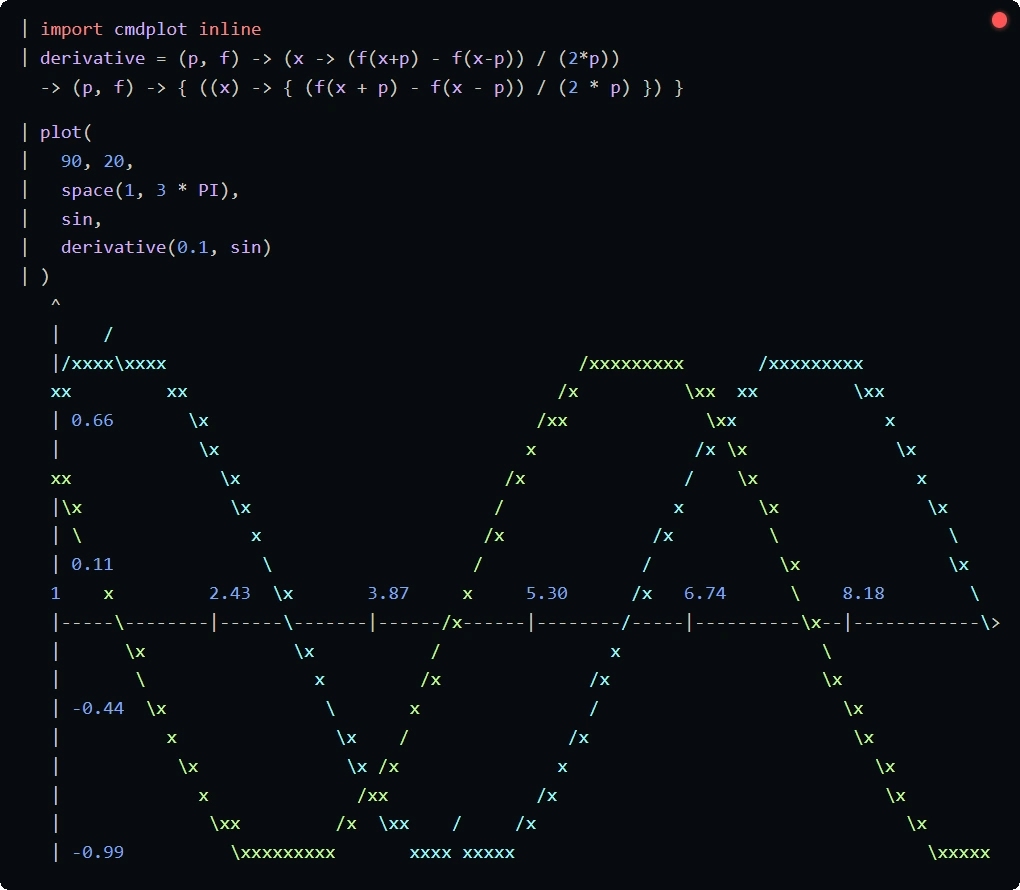
Circle using cmdplot
This snippet creates a list of points along a circle, and then uses the plotting module to visualize them.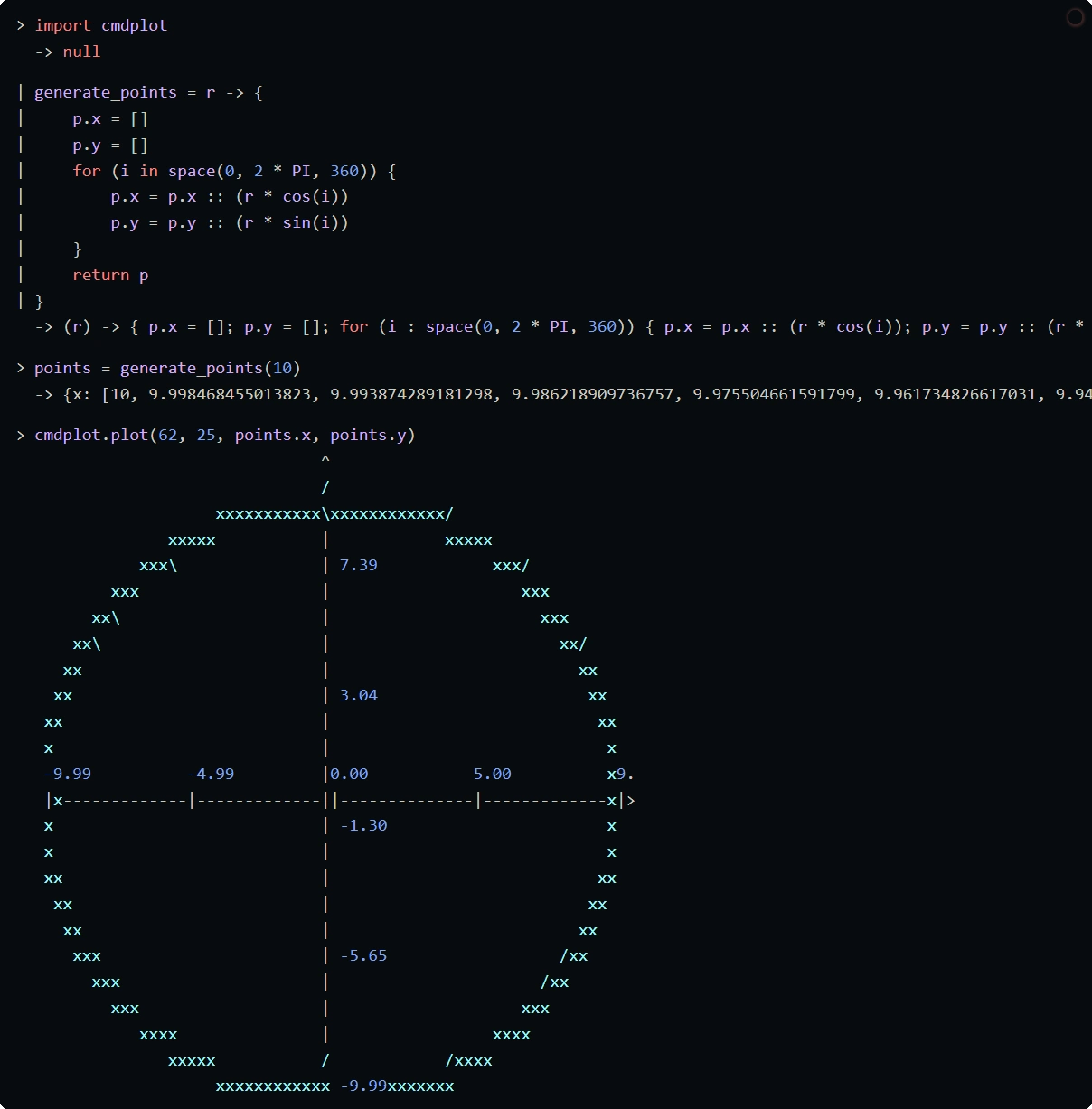
Please check out the project documentation for more examples, there's some cool stuff on there.